Feature gating is a method of controlling what deployed code is available to managed groups of users. This is often used in A/B Testing and Canary releasing. It is also used as way to provide an off switch for risky code in production.
A user's experience can be gated in many ways:
- Date: only allow execution of code after or until a certain date,
- Time: only allow execution of code between certain hours,
- Geographic area: certain laws are only applicable in certain regions,
- Arbitrary identifier: clients with certain ids or range of ids,
- Combination of any of the above
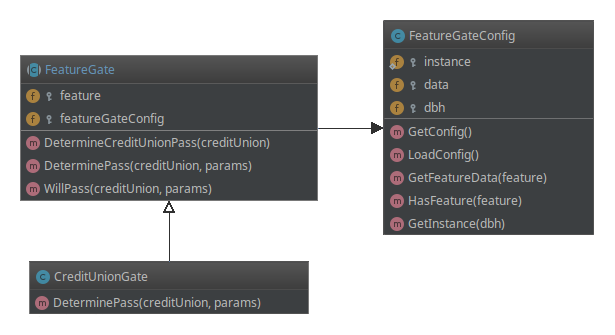
To facilitate feature gating HomeCU code, the following classes have been created:
FeatureGate(app/web/shared/library/FeatureGate.i) Abstract base class. Being abstact, this class cannot be instantiated.FeatureGateConfig(app/web/shared/library/FeatureGateConfig.i) A singleton class used by FeatureGate that reads the config from thecufeaturegatetable.CreditUnionGate(app/web/shared/library/CreditUnionGate.i) Implementation of FeatureGate that gates by credit union code.
How to Use
To use a feature gate, an instance of the singleton class FeatureGateConfig must first be created.
Being a singleton, the first time in a session that GetInstance() is called an instance of FeatureGateConfig is created; the database table is read; and the instance is stored. Thereafter, every time GetInstance() is called the stored instance is returned instead of a new one.
Then this config is then passed to a new instance of the feature gate. Assume that a feature gate with an id of "BETADATAGRID" has been configured in the database with a list of credit unions that have agreed to beta test a new data grid feature. A constant containing this id has been created in the CreditUnionGate class for error free usage.
Now it's a simple matter of enclosing the code to be gated in an if. Assume that $cu contains the code for the current credit union.
If $cu contains the credit union code of one of the beta testers, WillPass() will return true.
How to Configure
Configuration of the cufeaturegate table can be done on the Monitor > Feature Gating screen. There, configurations can be created, updated, and deleted.
Fields
- Feature : required; cannot be changed once created. This is the id passed into the FeatureGate constructor.
- Description : a thorough description of the feature gate and how it is used in a maximum of 255 characters.
- Enabled Scope : dropdown list with these choices:
- Enabled For All : all credit unions are able to use this gate
- Disabled For All : not enabled for any credit; turned off
- Enabled For Specific CUs : only allowed for credit unions added to the list - must be in JSON formatted list
- Extra Params : advanced custom data field used by feature gates requiring extra data to operate (see next section).
Saved/updated feature gates are immediately available. However, any FeatureGateConfig objects still in a request session will have the old configuration. Once that session ends, any new requests will pick up the configuration.
Extending Feature Gates
As listed in the introduction, there are many ways to gate a user's experience. New feature gate classes can be easily created to handle these other ways of gating.
Here is a gate that only passes after a certain date and only allows credit union codes that start with a configured letter. A database configuration exists with id "BEGINWC41" that contains "2020-04-01" and "C".
This would be used in the same way.
If there's a need to gate after December 25th and only allow credit unions that begin with "W", then an appropriate configuration in the database is created and a new constant is added to the AfterDateBeginWithLetterGate class.
The goal is craft the class with the gate's logical framework and to use the database configuration to hold the hard-coded specifics.